← Practice · October 6, 2026
Configuring Keenetic and Netcraze with AI: a real case
How Claude Code configured two Keenetic/Netcraze routers: dedicated LAN ports, a secure connection to my own server, the RCI API and a kill switch.
11 min readnetworking
Can you explain a task to an AI by voice from your phone and end up with a configured network at two different locations? In my case, that is exactly what happened. I communicated with the Claude Code agent through a messenger, while it worked in a terminal on a server: examining the configuration, running commands, reading logs and checking connections.
The task was specific. Certain equipment connected by cable had to access the internet only through a secure tunnel to my own server. If the tunnel stopped working, access had to stop completely. The rest of the home network, including Wi-Fi, had to keep working as before.
Configuring a Keenetic router with AI turned out to be a full engineering task. Along the way, we encountered double NAT, incompatible configurations, an unstable connection to a data center and insufficient memory. Below is how the agent handled these constraints and the role I retained throughout the process.
What Keenetic and Netcraze routers are
Many Russian users know Keenetic as “Кинетик.” The misspelling “Кенетик” also appears in searches. Netcraze has a similar story: people write the name as “Неткрейз,” sometimes “Неткрейс.” Searches with different spellings often reflect the same task: understanding a familiar router and its settings.
In Russia, the company that previously represented Keenetic began supplying equipment under the Netcraze brand in 2025. This is stated in the company’s official announcement. So the question “Are Keenetic and Netcraze the same thing?” is natural: users recognize the platform, interface and configuration principles.
For the scenario described here, the approaches are indeed similar: segments, components, connection policies and the CLI. The documentation uses the names KeeneticOS and NDMS. But compatibility for specific features still needs to be checked against the model, system version and installed components. Firmware or configurations must not be transferred between devices solely because their names are similar.
There is also a distinction in cloud services. The KeenDNS service familiar to Keenetic users has its Netcraze counterpart in CrazeDNS. It uses names such as *.netcraze.club and *.crazedns.ru; these domains are listed in the Netcraze documentation. Below, references to remote access through KeenDNS also cover the corresponding CrazeDNS scenario.
What an AI agent can—and cannot—do
A regular chat answers questions. An agent with terminal access can do work: send requests, run diagnostic tools, create small programs and check results.
In this case, Claude Code ran on a server. I sent instructions from my phone by voice and text. To give it access to the router, I provided the cloud hostname and credentials. The agent then independently investigated the available management methods.
“AI configured the router” here means a sequence of actions:
- identified the model, system version and network layout;
- found a working remote connection method;
- prepared changes to ports, segments and routing;
- checked the router’s responses and error logs;
- changed the solution when the initial setup did not work.
At the same time, an AI cannot see where a cable is physically plugged in unless someone tells it. It cannot add memory to a device or guarantee the quality of an ISP’s connection. It can misinterpret an API response or suggest a command from a different firmware version.
That is why using AI to configure a network requires feedback. A command needs a verifiable result, a change needs a clear purpose, and a risky step needs a recovery method. As the owner, I still defined the task and checked the equipment on site.
The case step by step: from a cloud hostname to two working sites
1. Find a way in through double NAT
The first router was behind another router supplied by the ISP. This created double NAT: an incoming connection from outside could not simply be forwarded to the required device.
SSH was unavailable from outside. The available cloud access route supported the web interface, so the agent investigated its HTTP API.
This is an important detail when configuring a router remotely through KeenDNS: access to the web panel does not mean SSH and every other service are automatically available through the same address. You need to establish which channel actually works.
The agent connected to RCI—the management interface at /rci/. It worked out the authentication process and wrote a small utility for sending management requests. CLI commands were executed through it, and actions and responses were logged.
This provided a repeatable management method: send a command, see the result, then check the modified configuration.
2. Put the equipment in a separate segment
I wanted only the devices on specific wired ports to use the secure connection.
The agent assigned the required LAN ports to a separate VLAN and linked them to a separate Bridge segment. It configured a dedicated DHCP service for the segment so connected equipment would automatically receive addresses from its own subnet.
A separate network for Keenetic ports is useful because the rule is tied to the connection point. Plug a device into the selected port, and it joins the required segment. Replacing equipment does not necessarily mean rebuilding a list of individual clients.
Wi-Fi and the remaining ports kept their previous setup. This was one of the main requirements: changing the route for the designated equipment must not change how the entire home network behaves.

The dedicated ports have their own segment and access the internet only through the tunnel; the home network works as before.
3. Configure a kill switch
The agent then created a separate internet access policy—ip policy. It included only the VPN interface and assigned the policy to the dedicated segment.
The distinction between giving the VPN high priority and making it the only permitted connection is critical here. With ordinary failover, the router can switch a client to another available connection. That behavior was unacceptable for this task.
The selected equipment required strict rules:
- the secure connection is working—traffic goes through it;
- the secure connection is unavailable—there is no internet access;
- home devices continue using their own connection.
This is how the Keenetic kill switch works in this setup. However, a policy entry alone is not enough to claim there are no leaks: DNS, IPv6 and any additional routes must be checked separately.
4. Resolve the AmneziaWG configuration issue
The agent first tried the supplied AmneziaWG settings. The connection failed to establish: there was no handshake.
Investigation revealed a version incompatibility in this case. The specific installed firmware, version 5.1, supported the first version of AmneziaWG, while the supplied configurations were labeled version 3.1.
This observation applies to the tested build and those specific files. When repeating the setup, firmware capabilities, configuration format and protocol version need to be checked separately: an application’s version number alone does not establish compatibility.
The agent had to abandon the initial option and build a connection to my own VPN server.
5. Check what is happening between the data center and the ISP
After the server was deployed, the next problem appeared: connections were established but dropped after a few seconds.
The agent used tcpdump on the server for diagnosis. Packet capture helped reveal how the connections actually behaved. Tests with different protocols supported a practical conclusion: connections to a particular data center are unstable with this ISP.
The setup was revised. The router connected through OpenConnect to an intermediate server in a Russian data center. From there, traffic was routed through a WireGuard tunnel to the main server.
The resulting chain was:
Dedicated devices
        ↓
Keenetic / Netcraze
        ↓ OpenConnect
Intermediate server in a Russian data center
        ↓ WireGuard
Main server → internet
The extra node made maintenance more complicated but provided a working route. In this architecture, protection against direct internet access must also be implemented on the intermediate server: failure of the second tunnel must not create a fallback path for the equipment’s traffic.
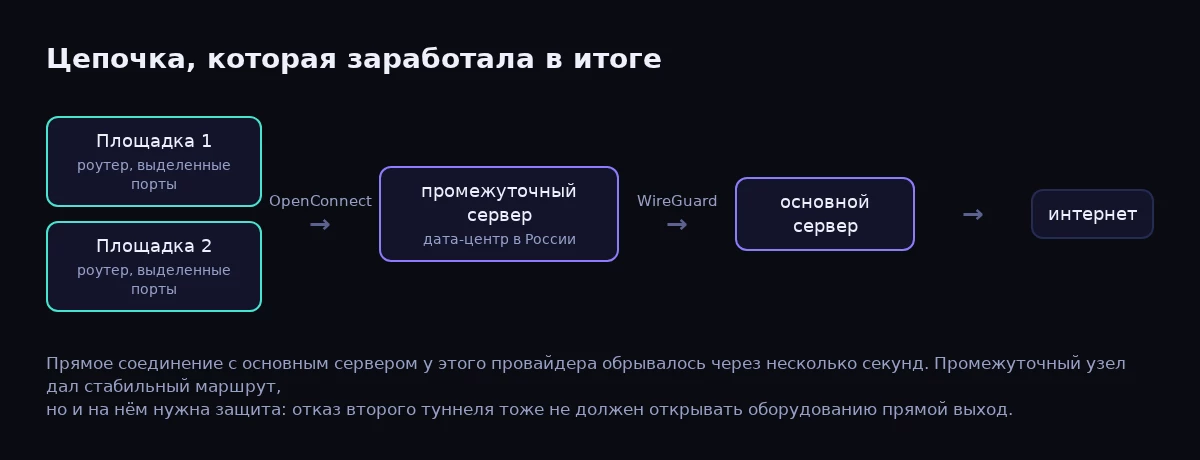
The final chain: both sites connect through OpenConnect to the intermediate server, then through WireGuard to the main server.
6. Find the OpenConnect commands and free up memory
OpenConnect is available as a built-in system component. It is installed by changing the component selection, as described in the official Netcraze instructions.
The agent established the syntax of some management commands in an unusual way: it read the JavaScript in the router’s own web interface. This revealed the commands used by the interface, including openconnect upstream and authentication identity.
A hardware limitation appeared at the second site. The simpler router could not install the component: the log showed 507 insufficient storage.
The agent identified the cause, removed a traffic classification component that was unnecessary for this task, and retried the installation. After space was freed, OpenConnect could be added. This approach is consistent with how the system works: the manufacturer warns that not every combination of components fits on every model.
Before reboots, the agent warned me, saved backups and continued logging its work. It also consulted GPT for a second opinion to check its decisions.
In the end, both routers served the dedicated ports through a secure connection with protection against direct internet access in place. I checked that it worked using a laptop.
Technical details: the RCI API, segments, ip policy and OpenConnect
How the agent managed the router through RCI
The Keenetic RCI API uses HTTP requests, /rci paths, GET and POST methods, and JSON data. The manufacturer describes this mechanism in its API access documentation.
For example, a system status request looks like this:
GET /rci/show/system
In this case, the agent implemented web session authentication using a challenge and MD5/SHA-256 hashes. The general sequence is to obtain the authentication parameters, calculate a response using the credentials, create a session and send subsequent requests with its cookie.
This mechanism cannot automatically be applied to every access method. For example, the router’s separate HTTP Proxy uses Digest authentication. The client must follow the device’s actual responses.
The agent’s utility linked commands, requests and results. This was where Keenetic configuration automation began: repeated operations ran consistently, errors were saved, and the state could be compared before and after a change.
How a policy is linked to a segment
Below is a shortened example for a new, separate policy, an existing Bridge1 segment and an already configured OpenConnect0 VPN interface:
ip policy Policy1
 no permit auto
 permit global OpenConnect0
 exit
ip hotspot policy Bridge1 Policy1
The names are examples. Before applying this, check that Policy1 is unused and the interfaces exist. These lines do not create a VLAN, DHCP service or VPN, and they are not a complete router configuration.
The permit global command allows a policy to use a specific connection. no permit auto disables the automatic addition of new connections. The syntax is described in the Keenetic CLI reference.
To configure a VPN on Keenetic for individual devices, you can assign a policy to specific clients. In this case, assigning it to an entire wired segment was more convenient.
VLANs separate local networks, while firewall rules determine which connections between them are allowed. If the equipment needs to be isolated from the home network, that must be checked separately from the choice of internet connection.
What matters in OpenConnect and result verification
The OpenConnect configuration includes the server address, authentication parameters and interface state. For example, the individual command for setting a username looks like this:
interface OpenConnect0 authentication identity USER_PLACEHOLDER
This is a fragment, not a set of instructions for starting the tunnel. The openconnect upstream parameters, certificate verification and other settings must be checked against the installed system version.
After verification, save the configuration:
system configuration save
Acceptance testing covers several conditions: a working connection, OpenConnect disconnected, WireGuard between the servers disconnected, and connection recovery. DNS and IPv6 are also checked. If IPv6 is not included in the secure setup, the dedicated segment must have no independent internet access through it.

When the tunnel drops, the dedicated equipment loses internet access, while the home network keeps working.
Security: the conditions for trusting an agent with a router
Router access makes it possible to change how the entire network works. Trust therefore needs to rest on observable actions and limits.
In this case, useful measures included backups, an operation log, warnings before reboots and additional discussion of decisions with another model. A second opinion helps identify mistakes, but the network’s behavior provides the final confirmation.
This kind of work needs clear rules:
- Define the task’s boundaries. Specify which ports and devices may be changed and which functions must keep working.
- Save the configuration in advance. The owner must be able to access the copy even if the remote connection is lost.
- Check changes in small steps. Read the device state and logs after each stage.
- Protect secrets. Passwords, keys and cookies must not appear in routine reports or published logs.
- End access when the work is done. Delete the temporary account or change the shared password, and terminate any active sessions that can be closed.
Administrative privileges may be necessary to change components and the network. But that is no reason to give the agent additional accounts or retain access indefinitely.
The environment in which the model runs also matters: what data is sent to an external service, and where history and logs are stored. The convenience of communicating through a messenger does not remove the need to control credentials.
How long it took compared with manual configuration
Timing from the agent’s logs:
- First router, basic setup—about an hour on the first day: working out cloud access, writing an API utility, and assigning ports to a separate segment with a policy. This was also when the supplied AmneziaWG configurations proved incompatible with the firmware.
- Finding a working connection—roughly two and a half hours on the second day: setting up my own VPN server, diagnosing connection drops with
tcpdump, switching to OpenConnect, and setting up the intermediate server and WireGuard tunnel between data centers. This also includes two router reboots. - Second router—about 20 minutes from obtaining access to a working tunnel, including the unexpected shortage of memory for the component.
An experienced network engineer would have completed the basic setup in roughly the same time. But manually finding the cause of connection drops and reading the web interface’s JavaScript to establish command syntax usually stretches into an evening or two. The main benefit of the agent was that I did not have to sit at a computer throughout: I described the task by voice from my phone and checked the result with a laptop when needed.
The time required for reboots, component installation and connection stability checks does not depend on the AI. Estimating the time for a particular setup first requires the router model, system version and access arrangement.
FAQ
Are Keenetic and Netcraze the same thing?
For many user tasks, these are similar devices with a shared technological foundation and familiar configuration principles. However, the brand does not guarantee identical hardware and features. The specific model and firmware need to be checked.
Will these instructions help if I search for “Netcraze router setup”?
Yes, the principles described also apply to Netcraze: a dedicated segment, a connection policy and a secure connection. Menu item names and component availability may differ.
Can an AI configure a router without SSH?
Yes. In this case, the agent managed the device through web access and RCI. Remote access and authentication with the required privileges must already be working.
Does Claude Code run directly on the router?
In this setup, Claude Code ran on a separate server. The router received management requests and executed its standard commands. The router itself did not need a powerful processor to run the AI.
Can only a few LAN ports be routed through the tunnel?
Yes. The ports are assigned to a separate segment, which is given an access policy. The remaining ports and Wi-Fi keep their previous settings. Access between segments is controlled separately.
What happens if the VPN stops working?
With a correctly configured and tested kill switch, the selected devices lose internet access. The home network continues working through its own connection. In a setup with an intermediate server, the failure of each tunnel is tested.
Is giving the AI a password enough?
A safe result also requires a defined task, a backup, a controlled execution environment and on-site verification. A password grants access, but does not replace engineering checks.
Need a similar setup?
If you need to put equipment on a separate network, establish a secure connection to your own server or configure Keenetic/Netcraze at multiple sites, write to us through the contact page.
For the first message, the router model, system version and a description of the task are enough: which devices must use the tunnel and what should happen when it disconnects. There is no need to send passwords in advance.
At ikorg.ru, you can also contact us about website development, automation and integrating AI into workflows. This case shows one practical scenario: the agent performs the technical work, and the result is checked on real equipment.